Build Notes · Case study: circularsurrealism.com
How to build an artist portfolio website and AI art archive: rooms, a real catalog, and live sale marks
How to build an artist portfolio website and AI art archive: the rooms, catalog and live sale marks behind a real 439-work site, vibe coded in Grok Build.
Most artist portfolio websites end up as one of three things: a nicer link page, a marketplace profile pretending to be a museum, or a grid that falls apart when you add video. The AI artist behind circularsurrealism.com wanted none of them: "Not a Linktree. Not a grid that dies when you add video."
This article is how that portfolio and AI art archive was built. Slowfreeze, an AI artist since 2022, vibe coded it with AI in Grok Build over about 8 weeks and 396 prompts, by describing it, checking the live preview, and sending screenshots until it was right. The site now holds 439 works in 27 collections across four chains, with live listings, a sales ledger, a print shop, a gallery and a zoom view. That makes it an AI art archive as much as a portfolio: a portfolio shows a selection of the best pieces, while this site keeps every work, each with its collection, year, edition and the links to where it can be bought. The examples are from an AI and on-chain artist, but the structure fits any artist with a body of work spread across platforms: painters, photographers, illustrators, musicians.
What should an artist website include?
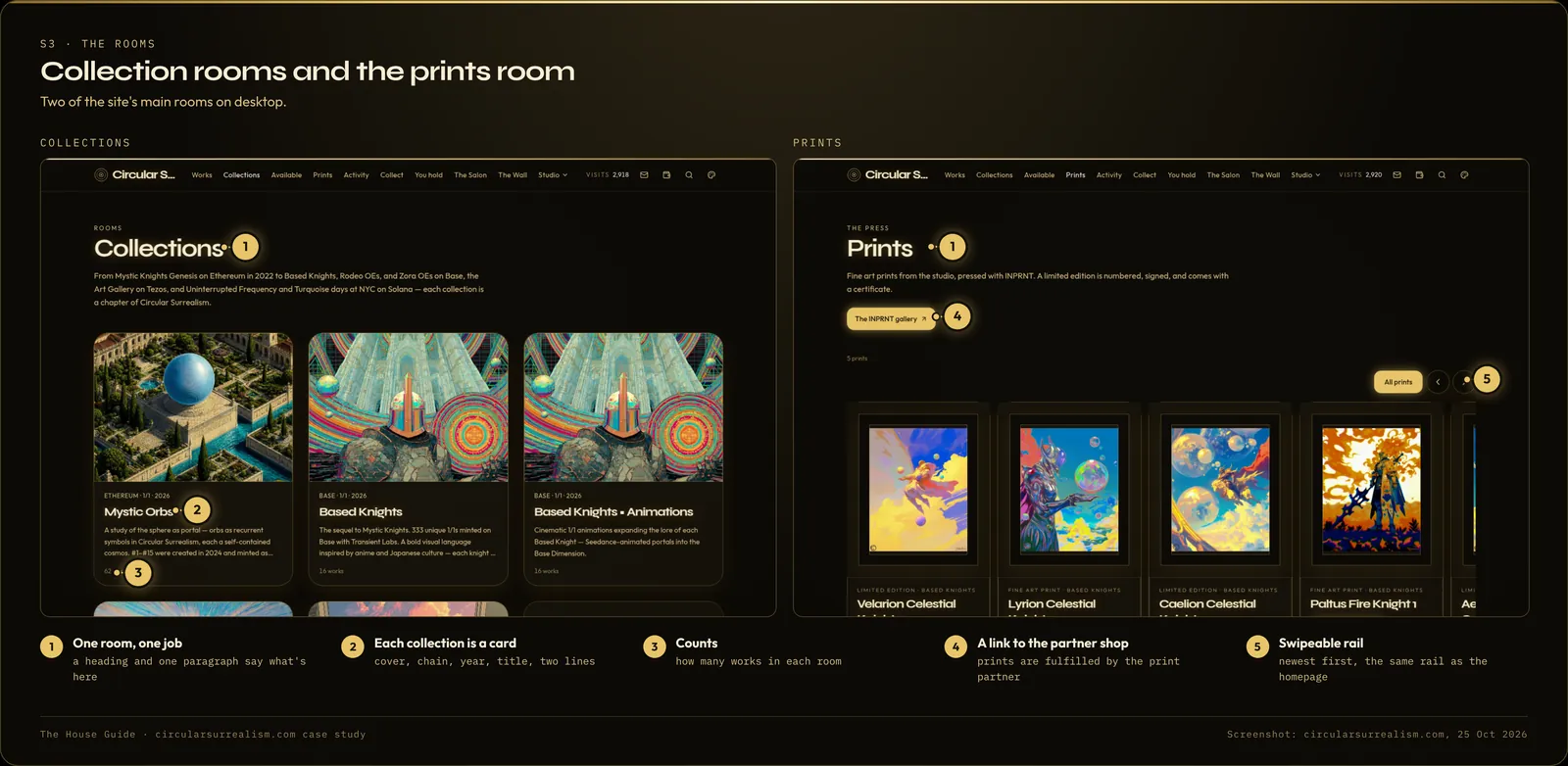
Start with jobs, not pages. "A house needs rooms with jobs. If everything is on the homepage, nothing is." Here are the rooms the case-study site ended up with, and the job each one does:
| Room | Its one job |
|---|---|
| Homepage | The door: who you are, recent sales, new work, then ways into the rooms |
| Works | The archive: every piece, filterable |
| Collections | The families of work, each with its own page |
| Available | Only what can be bought right now |
| Prints | Physical prints, through a print partner |
| Activity | The ledger of sales and mints |
| Collect | Where to buy, by market |
| The Salon and The Wall | The two rooms you walk through: a gallery hang and a mosaic |
| About, Process, Exhibitions, The Years, Articles, Contact | The story, under one "Studio" menu |
You don't need all of these. A painter might need Works, Collections, Available, About, Process and Contact. The rule is the same: if two rooms do the same job, one of them should go.
Step 1: Build the catalog before the design
The build did not start with "artist portfolio, dark mode, three pages." The first prompt handed over the domain, the link page, and the marketplace pages where the work already lived. The builder used those to gather the real pieces, so the first preview showed real work instead of filler.
Everything then hangs from one catalog: title, collection, year, image, video, edition, attributes, and the links out to where each piece can be bought. "It cannot invent your provenance. It can hang it."
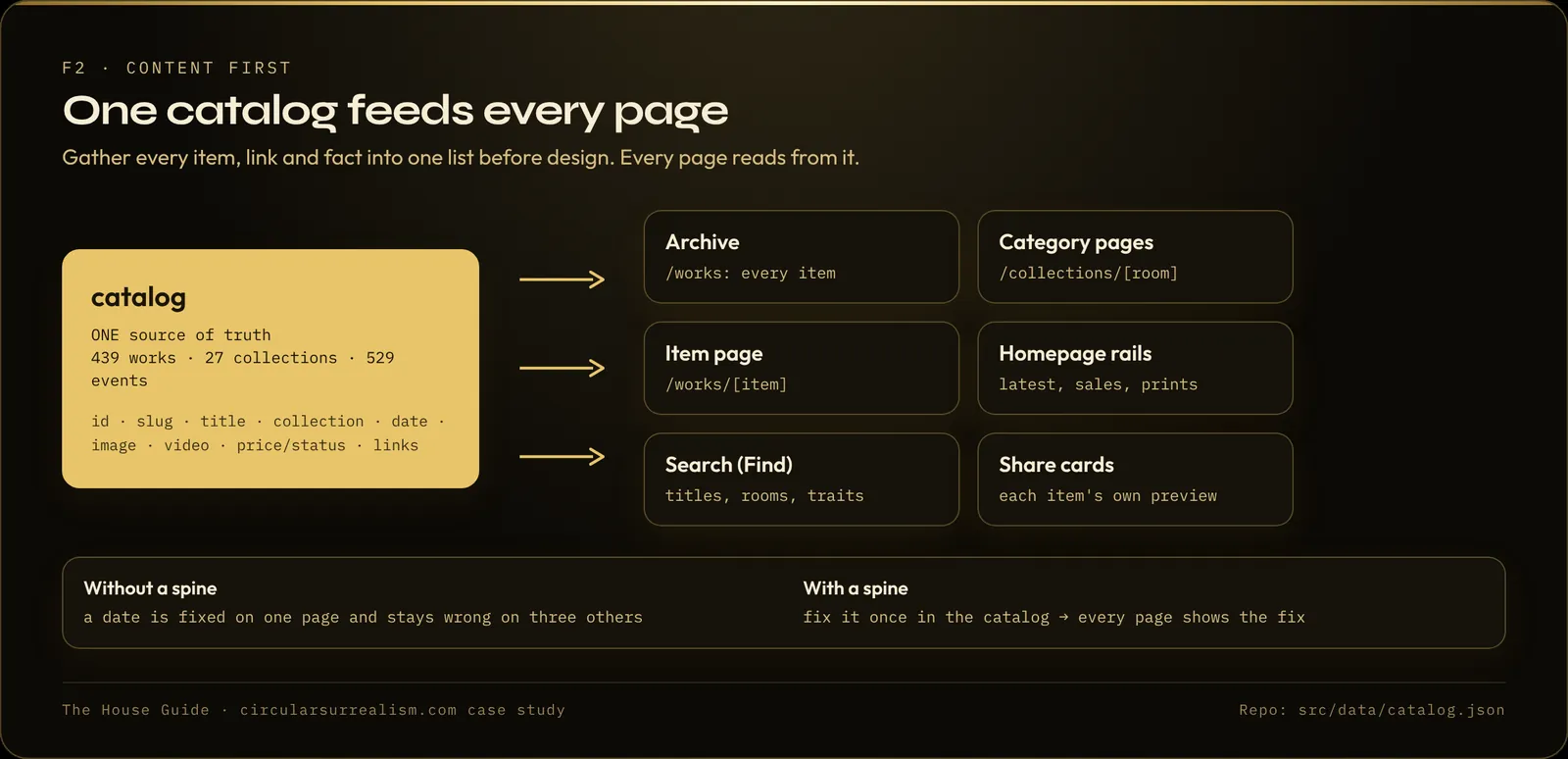
Make a spreadsheet with one row per work and these columns: title, collection, year, image, video (if any), description, attributes (for example Clan: Celestial; Tier: Mystic), links (every place it can be bought), and status or price.
Here is my full inventory of works: [paste or attach]. Build the site's catalog from this list. Every page should read from this one catalog, so when I fix a title or a date here it changes everywhere. Tell me if any rows are missing information you need.
Check your dates. In the case study, several collections showed the wrong year, so they sorted in the wrong place. The fix was to correct the year once, in the catalog.
Step 2: Give every work a true item page
Each piece gets its own page that shows the real thing and the next action. On the case-study site that means the media large, a zoom view, the title and the story in the artist's words, the details (resolution, collection, year, edition, attributes), buttons that go to the real shops, a "Buy as a print" option, and a quiet "Ask about this piece" line that opens Contact with the work already in the subject.
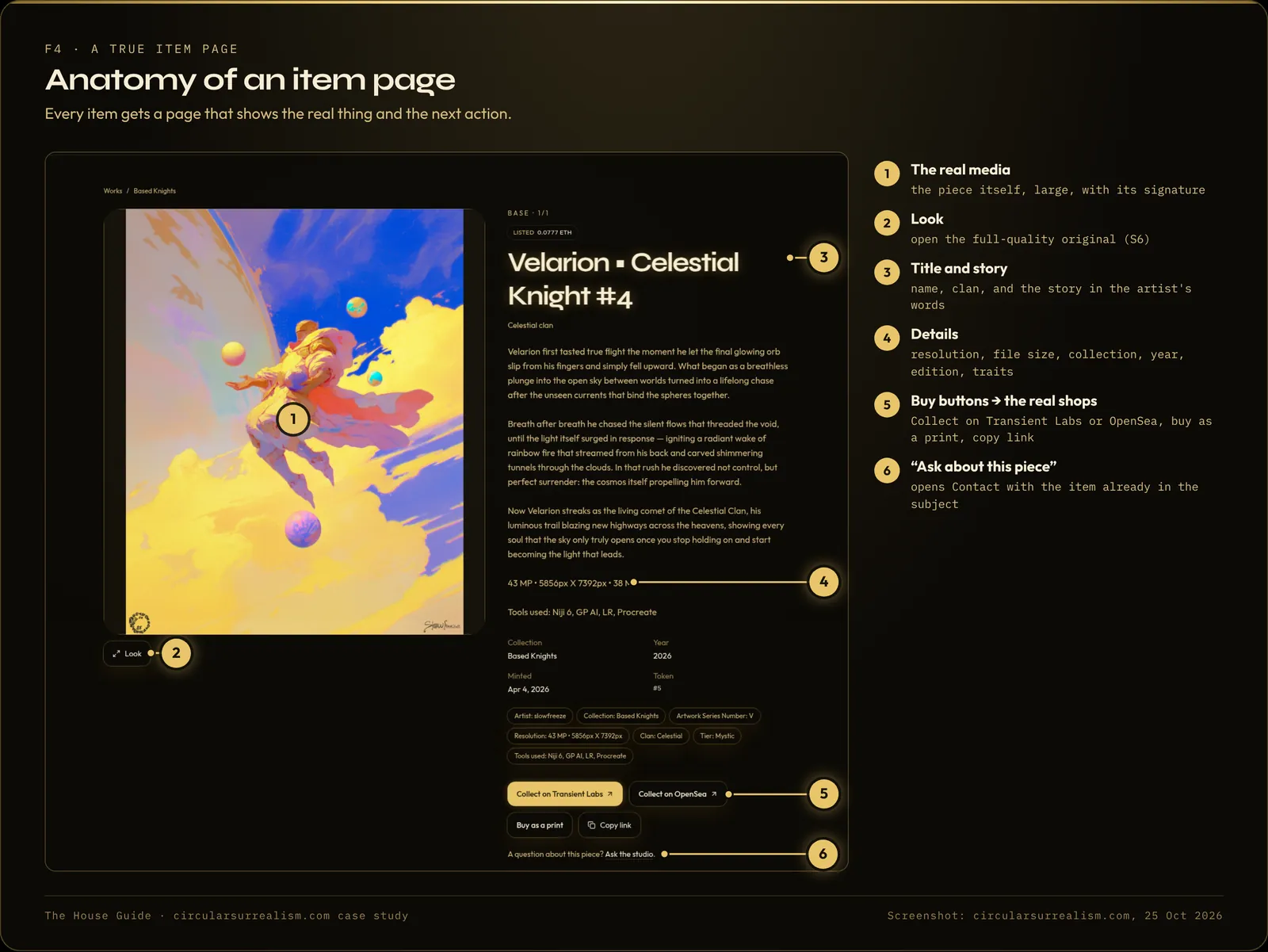
Make every work's page show: the original [image / video] large, the title, the story in my words, the details ([size, year, edition, materials]), and a main button to [buy at / enquire]. Add a quiet line "Ask about this piece" that opens the contact page with the work's name already in the subject.
Step 3: Make collection pages that hold the whole family
A visitor should enter a family of work, not a dump. Collections are ordered with the main lines first, then newest first. Inside one, visitors can filter by the attributes on each piece from one small button, not a row of pills across the page. Cards hang two per row on a phone and three on a computer.
Count what each page shows. "If a collection has sixteen animations, you show sixteen. Not eight." One collection showed 8 of its 16 pieces until that was pointed out.
Step 4: Let the site say what is for sale, by itself
This is "the difference between a brochure and a house." The artist did not want to log in every Sunday to type that a piece had sold.
On the case-study site, live listings are checked about every 90 seconds from the marketplaces that offer it (Transient Labs, Manifold, Objkt and Networked.art) and merged into one list. Available, the homepage sales row, the ledger and the mark on every card read from that list. If a market doesn't answer, the site shows the last known state instead of going blank.
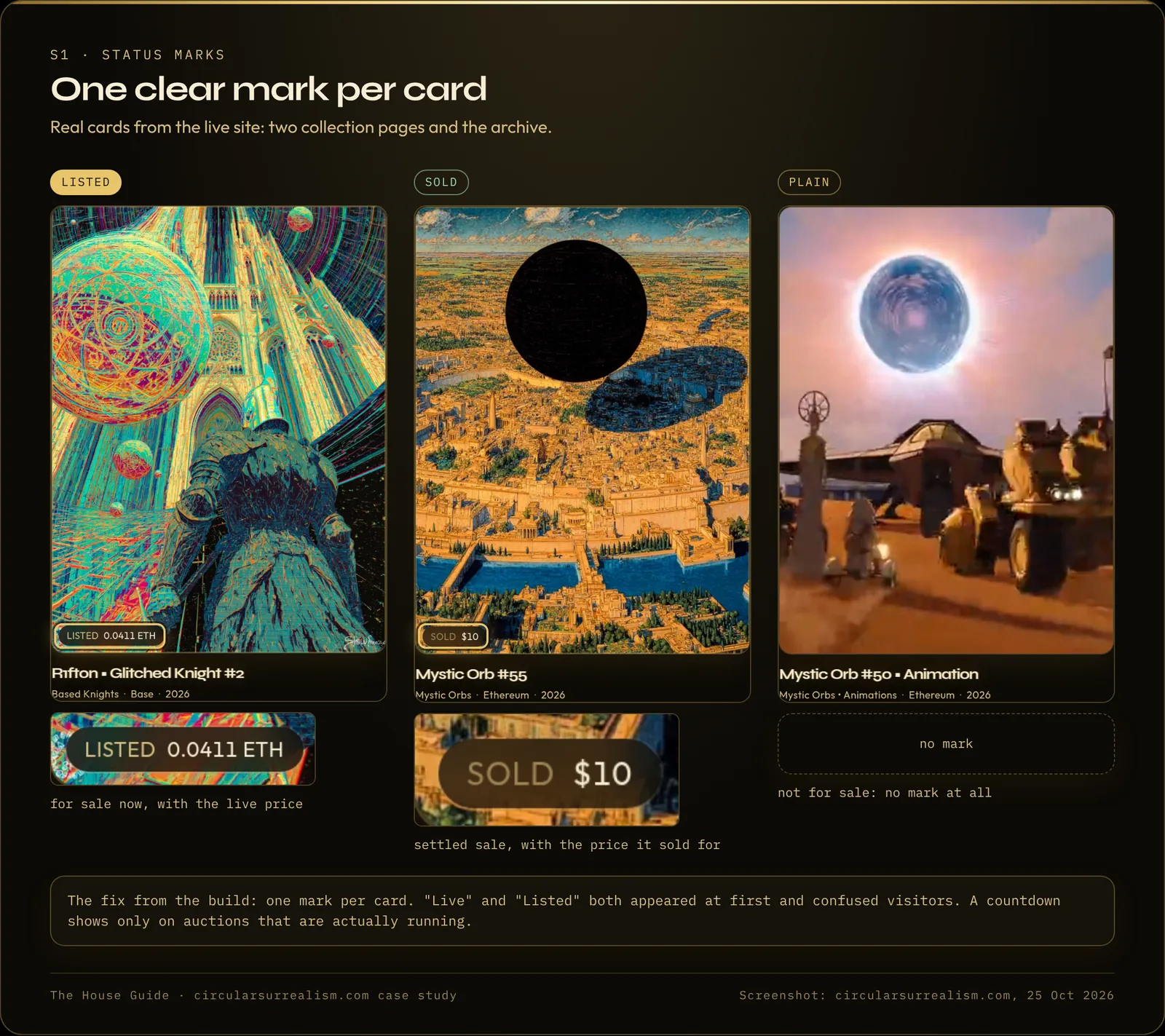
Keep the marks simple. At first some cards said "Live" and others "Listed," which confused visitors. The fix was one mark per card: Listed with the price, Sold with what it sold for, or no mark at all. A countdown appears only on auctions that are actually running.
If you sell through a shop instead of marketplaces, the same idea applies: ask which of your sources can be read live, and which need to be updated by hand.
Step 5: Hang the work in its real shape
For a gallery page, the artist asked for something that could "load fast and not make the website crash" and show pieces based on whether they are vertical or horizontal. The result is the Salon: portraits stand tall, landscapes open wide, squares hold the centre, all in one hang you scroll like walking a gallery. It uses stills to stay light and opens the full piece on tap.
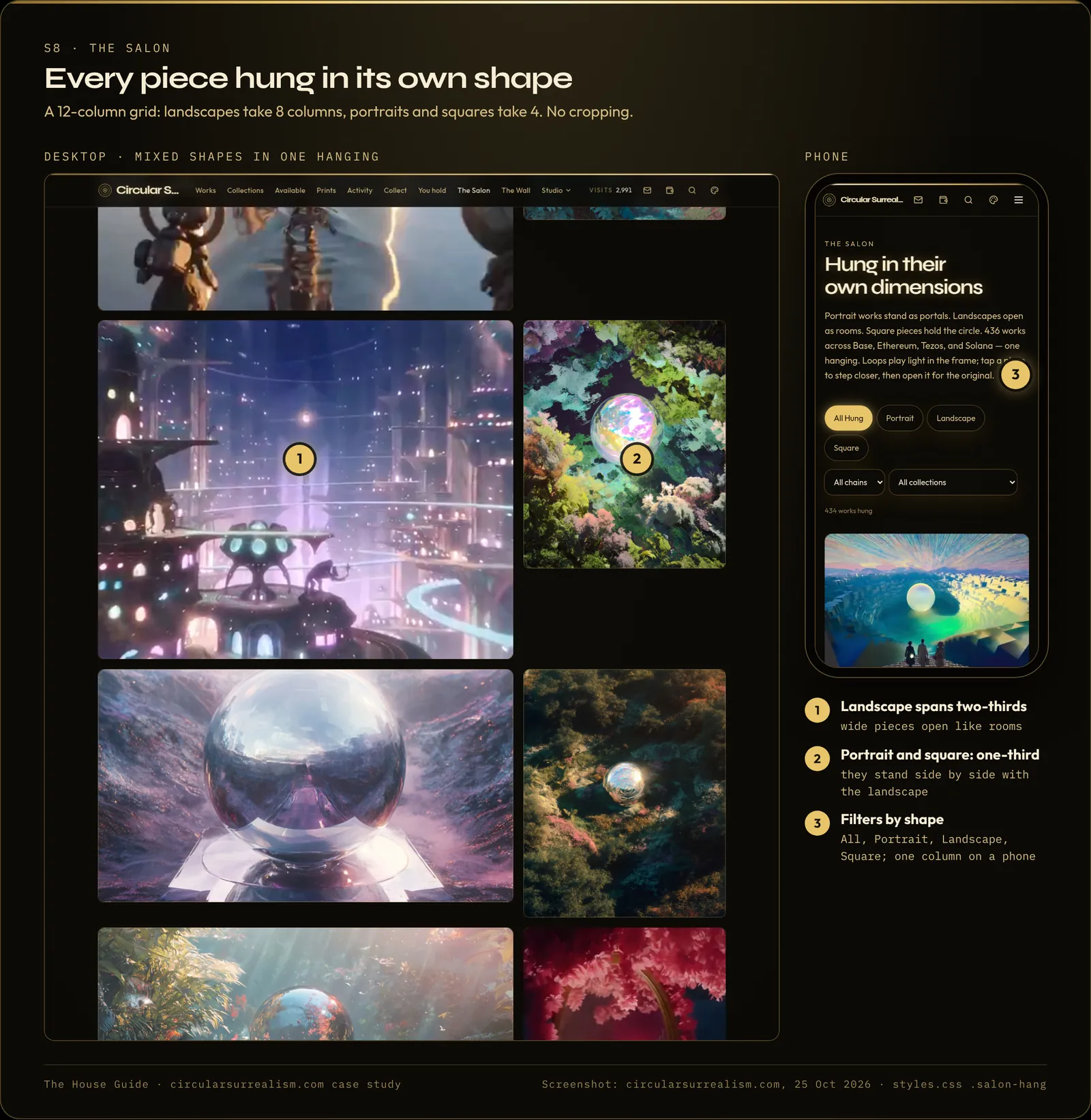
A 3D gallery was tried and dropped the same day. In the 3D version the images "did not load with the HDR they need in order to shine and glow." Judge every flashy feature on one question: does the work look as good or better?
Step 6: Give heavy showpieces their own door
The Wall, a mosaic of every piece laid into the artist's seal, started on the homepage and crashed phones at around 90 to 130 tiles because each tile loaded the original file. It now lives on its own page, with each tile a small 128 px image, and the homepage keeps a sentence and a button. The full method is in Website slow on mobile? 8 fixes for AI-built image and video sites.
Step 7: Keep the menu short
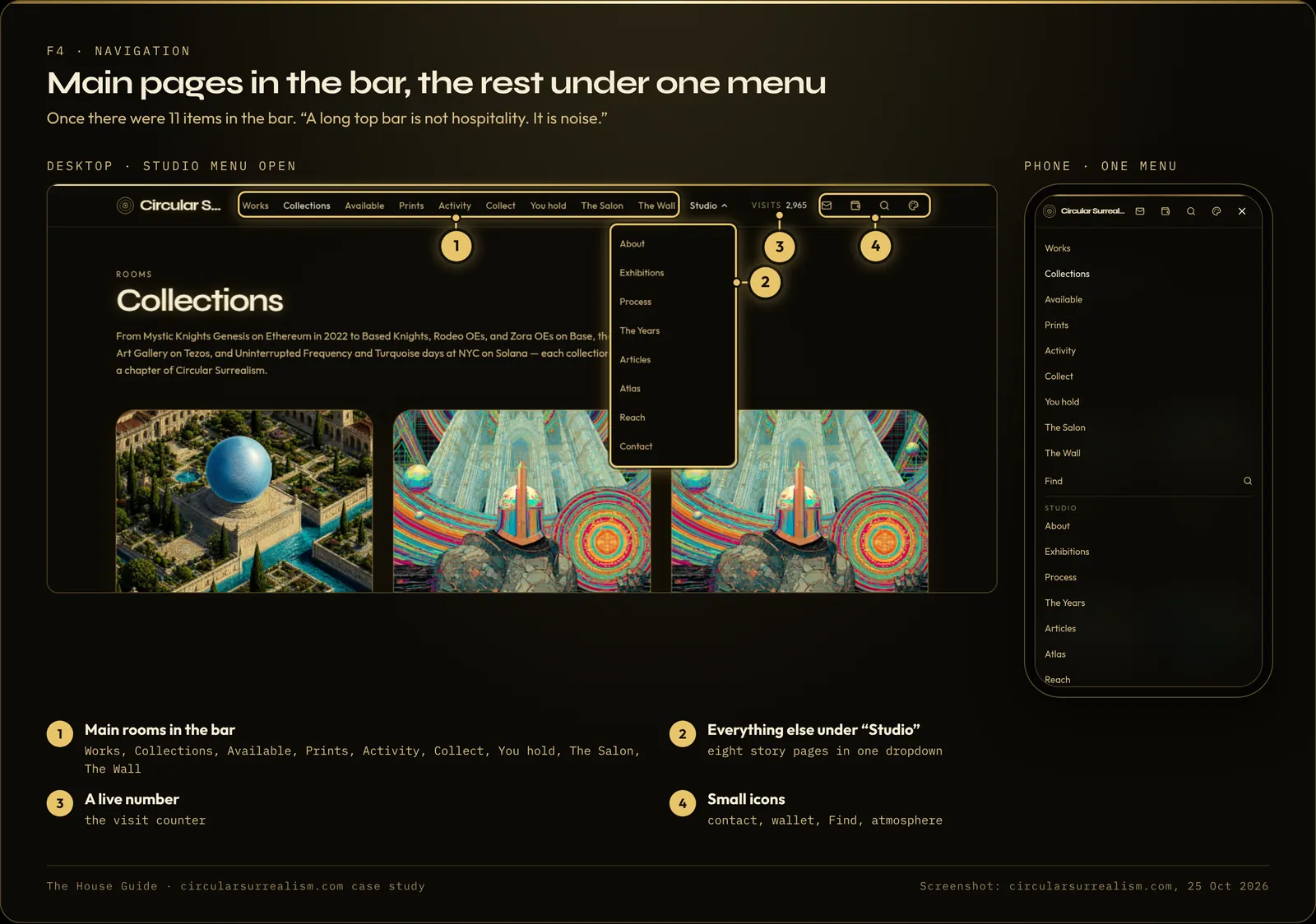
At one point the top bar had 11 items, a lot on a phone. The main rooms stayed in the bar and the story pages (About, Exhibitions, Process, The Years, Articles, Atlas, Reach, Contact) moved under one "Studio" menu. "A long top bar is not hospitality. It is noise."
Step 8: Write the story pages yourself
The builder can lay out About and Process. The words should be yours. On the case-study site, Process exists "so nobody leaves thinking a prompt is the piece," and it ends with links to Available, All works and Collect, "because after the method, a person should be able to take a piece home." Exhibitions shows the real show the AI art was in (Art Den, New York, April 3–4, 2024), with photos.
Step 9: Check how a single work looks when shared
When someone pastes a link to one piece into a chat app, the preview should show that piece, not your generic site card. On the case-study site the site-wide card kept overwriting each piece's card. The fix that held was setting each piece's share card on the server. For animated pieces, a small JPEG still of the first frame made the previews show up in messaging apps.
Artist portfolio website examples: what this one has that most don't
The build's own list: four chains, hundreds of pieces, live listings, a sales ledger, collect buttons that go to the real market, a print shop, a read-only "You hold" room for collectors, a real zoom into the original files, a timeline of the years, a gallery, a mosaic, a process page and exhibitions, "and still opens on a phone." None of it came from a template. It came from the catalog, the rooms and a lot of "no, not yet."
If you are starting out, the order is the same as in How to build a website with AI, step by step. When you are ready to go live, see Grok Build: publish, custom domain and GitHub backup, and keep the lost-preview recovery guide close.
FAQ
Can you build an artist portfolio website with AI?
Yes. This one was vibe coded with AI in Grok Build: the artist described each room, looked at the live preview, and said what was wrong until it was right. It took about 8 weeks and 396 prompts.
What is the best way to show video work on a portfolio site?
On the case-study site, cards play light 720p loops or a still, and the full-quality video plays only when someone opens the piece.
Do I need NFTs or crypto for this structure?
No. The on-chain parts (live listings from marketplaces, the wallet room) are optional. The catalog, the rooms, the item pages and the gallery work the same with a shop or an enquiry button.
How much did it cost?
The build ran on the $11-a-month X plan at the time, plus at least $75 in $5 credit packs. Plans and prices change, so check the current ones.
Go further
The whole build is written up in The House Guide, including the catalog, collection pages and shop, live marks, the gallery, the zoom view and the optional Web3 rooms. It also has two worked examples outside art: a freelancer portfolio and a small business site. Quick Start covers planning, performance and publishing.
The guides
Build your own high-end site with AI
The House Guide
Most complete$29$39
$29 founding price for the first 50 buyers, code FOUNDING50
- 20 modules, 102 written lessons
- 126-page PDF + EPUB
- Deep dives: live data, live counters, catalog and shop, performance, deep zoom, hero and search, gallery, themes and UI
- Prompt library (18 prompts), troubleshooting playbook, build diary
- 30-day refund
Quick Start
$19
- 7 modules, 39 written lessons
- 55-page PDF + EPUB
- Planning and content, the full performance module, publish, domain, backup, launch review
- Prompt library (18 prompts)
- 30-day refund
Performance Checklist
Free
- 12-item checklist
- The full 7-lesson performance module
- 13-page PDF
Written guides, no coding needed, works with any AI website builder.
Built with Grok. The case-study site was built with Grok Build by xAI. This article and the guides are independent and are not made, endorsed or sponsored by xAI.