Build Notes · Case study: circularsurrealism.com
Grok Build publish guide: custom domain, GitHub backup, and recovering a lost preview
Publish a Grok Build app, connect a custom domain, export to GitHub, fix a publish stuck on Deploying, and recover a lost preview. From a real build.
These are the steps used to put circularsurrealism.com online with Grok Build, and the problems that came up along the way. The site was built in one conversation over about 8 weeks and 396 prompts. Screens and button names can change as Grok Build updates; the order of operations is what matters.
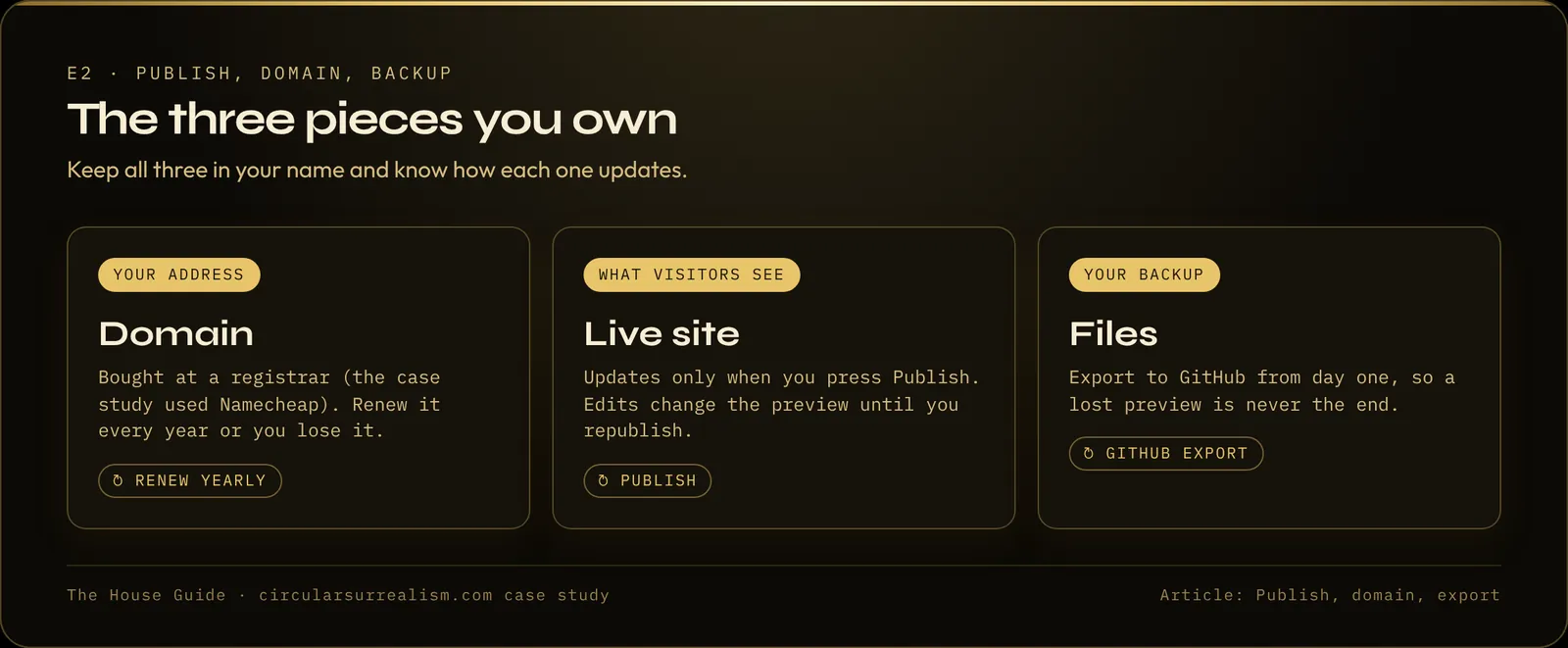
The three pieces you own
Keep these apart in your head:
- The domain name. Yours as long as you renew it at your registrar.
- The live site. That is the publish. It stays up through Grok Build.
- The files. Yours once they are exported to GitHub.
The domain alone is not the website. The website alone is not your name. You want all three.
Step 1: Publish your Grok Build app first
Publish the site so it exists on its grok.me address before anything else. That published app is what your domain will point to. Do not try to attach a domain to a project that has never been published.
Publish in chapters: when a group of pages is right, publish. You do not need a final version.
Grok Build publish stuck on "Deploying" or failing?
What caused it in the case study, and what fixed it:
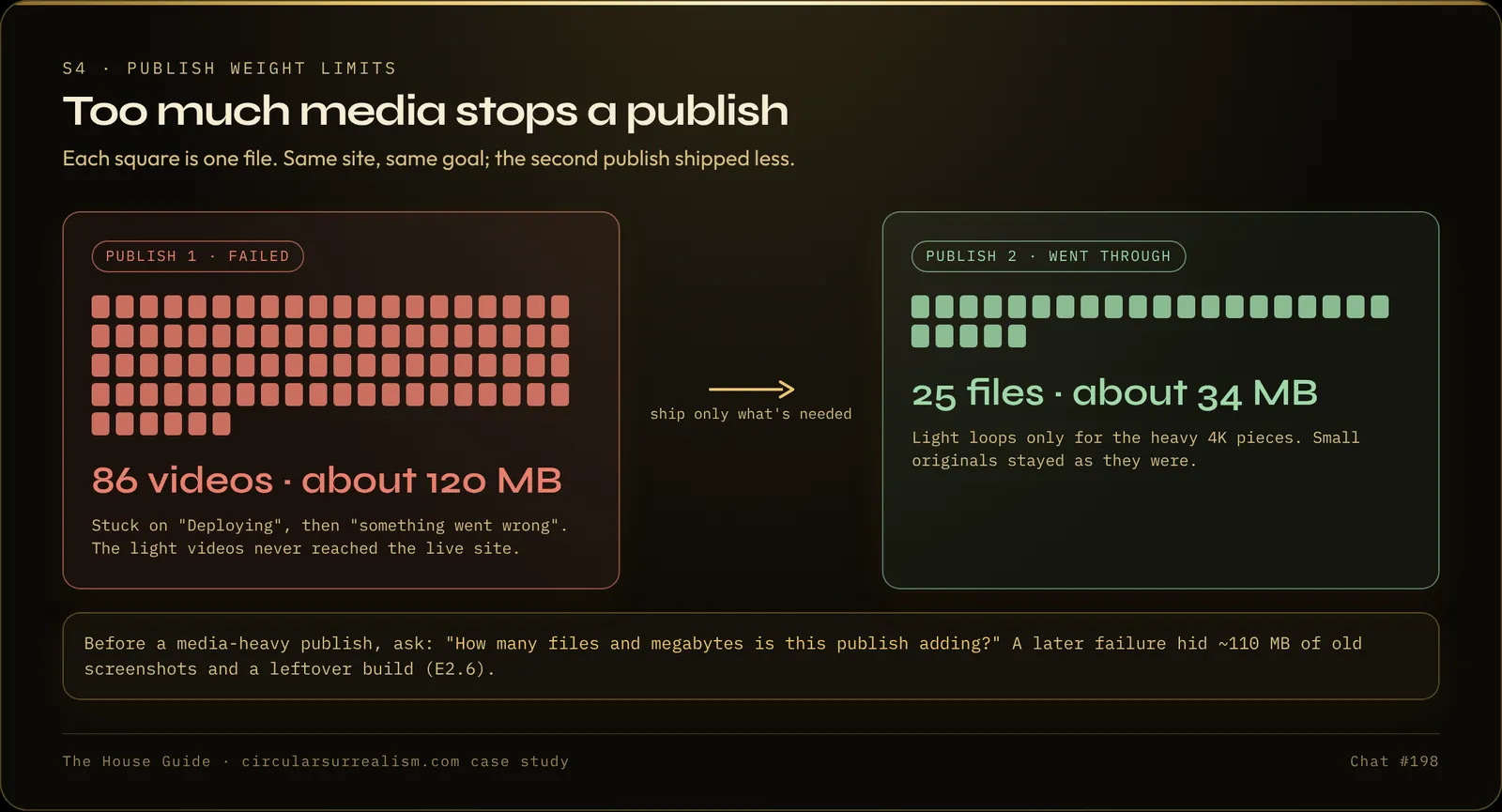
- Too much media in one publish. A publish with 86 videos (about 120 MB) sat on "Deploying" and then failed. Shipping only 25 files (about 34 MB) worked.
- Files the site never used. Another failure turned out to include about 110 MB of old screenshots and a leftover build. Removing them fixed it.
- A required security update. Once, publishing was refused until a framework security update was applied (1 to 2 October 2026 in this build).
- Double publishing. Do not tap Publish again while one is still deploying. Wait for it to finish or fail.
If the preview has something the live site does not, the publish did not finish.
Prompt:
Before I publish, tell me how many files and MB this publish adds, and remove anything the site does not use (old screenshots, leftover builds).
Step 2: Connect a custom domain you already own
Grok Build does not sell domains. Buy one at any registrar (the case study used Namecheap), then:
- Open the Publish / project sheet (the one with the URL, access and cover).
- Choose custom domain.
- Type your domain exactly, for example
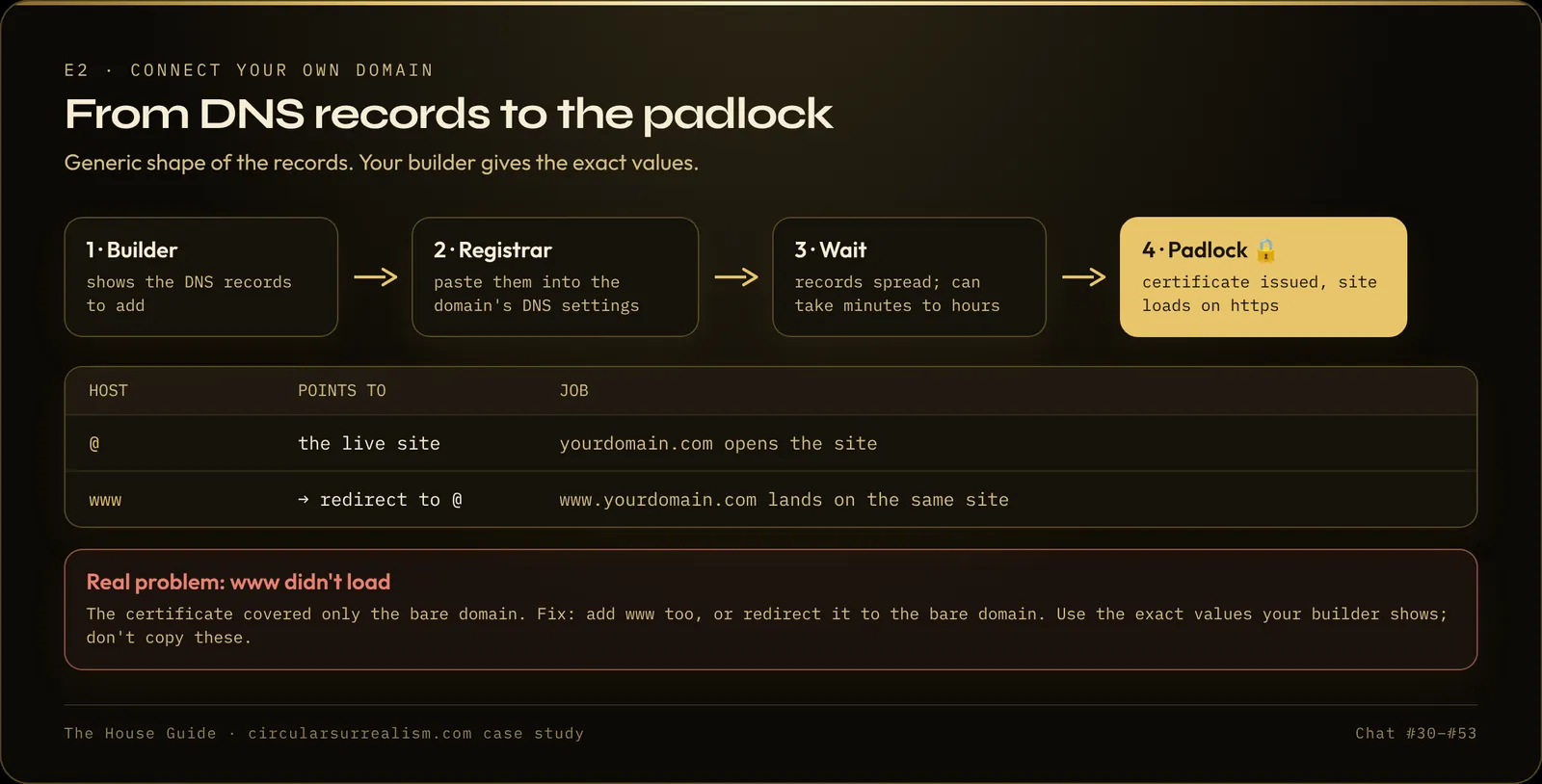
yourname.com. - Grok Build shows you DNS records, usually a CNAME or an A record. Copy them.
- At your registrar, open the DNS settings for the domain, paste the records, save.
- Wait. It can take minutes or a few hours. "Not Secure" in the address bar at this stage only means the security certificate is still being issued.
After that, every Publish updates your domain. You do not redo DNS.
Why www doesn't work (and the fix)
In the case study, the bare domain worked before www did. The domain had been entered without www, so only the bare domain got a certificate; www is a second hostname. The fix was a redirect at the registrar from www to https://yourdomain.com/. Share the bare domain everywhere; the redirect is the safety net.
Step 3: Export your Grok Build project to GitHub (do this early)
Export is not the live site. It is a copy of all the files in a GitHub repository you own. GitHub is free.
- Make a free account at github.com.
- In the same project, open the Publish / project menu.
- Choose Export to GitHub, sign in, and allow it to create a repository.
- Name it something you will recognize. Private is fine for a backup.
- Export again whenever a chapter is done, so the backup is not months behind.
If you are on a phone and cannot find the button, open the same account on a computer. The Publish sheet is easier to see there.
Step 4: Lost the preview? Restore from the live site, don't start over
Early in this build (2 to 4 September), the preview was lost. After a session that added themes, the preview would not load, and then the editing workspace had been wiped. The live domain was still up. The builder started rebuilding, and the rebuild came back missing features (sold marks, marketplace connections, whole sections). About $5 of credits went into that before the approach changed.
The first instinct is to rebuild from a blank chat. Do not. The published site is the source of truth.
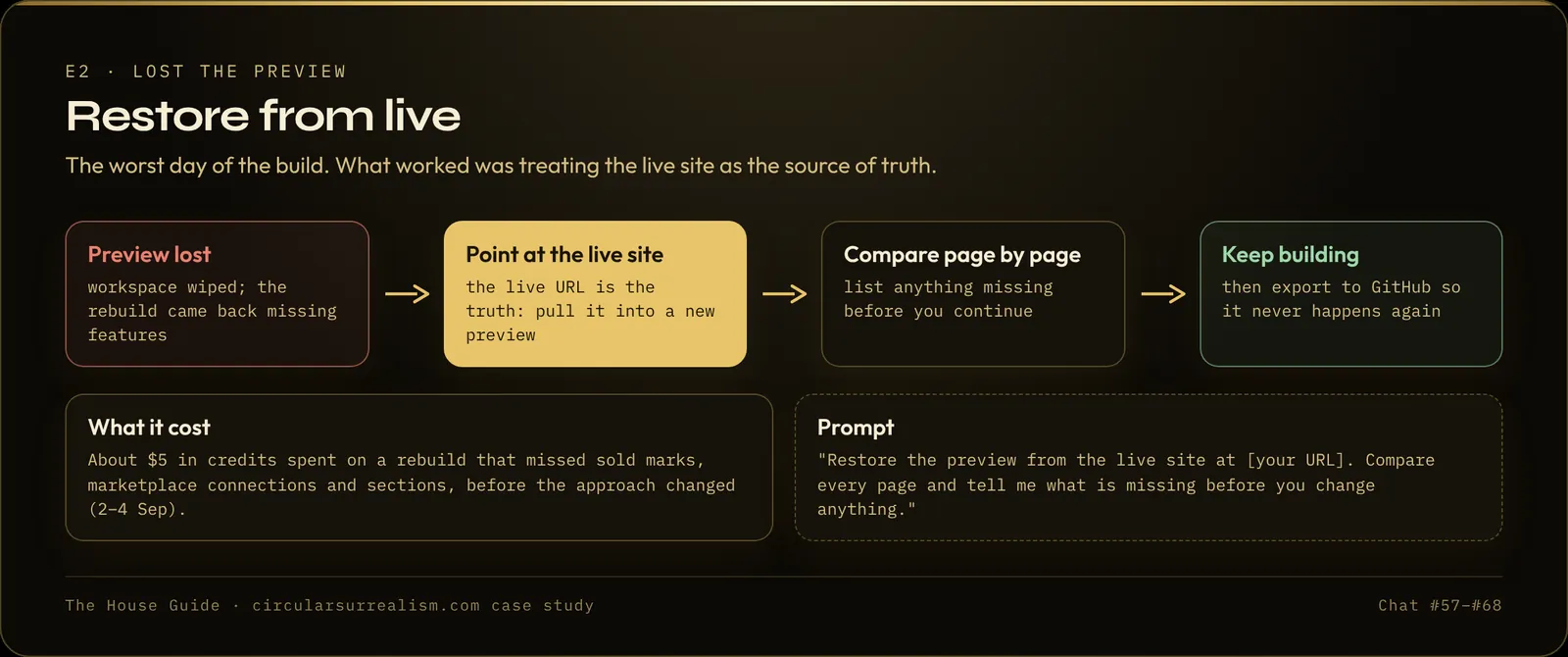
This is my live site: [your URL]. Restore the preview from it, keep every page, text and setting as it is live, compare every page and tell me what is missing before you change anything.
Then reconnect the domain if needed (the name does not vanish because a conversation did), and export to GitHub as soon as the preview is back.
Watch for: during the recovery in the case study, empty media addresses made pages hang. Ask the builder to check for empty image and video links after a restore.
Step 5: One site, one conversation
Keep every edit for one site in one thread. Edits stack, and connections you already set (domain, data sources) stay. A different site gets a new conversation. Mixing a side project into the main thread risks the main site.
Checklist before you share the link
- ☐ Published at least once on the grok.me address
- ☐ Domain connected and
wwwredirects - ☐ Exported to GitHub, and re-exported after the latest chapter
- ☐ I know the size of each media-heavy publish
- ☐ I know how to restore from the live URL
FAQ
Does Grok Build sell domains?
No. You buy the domain from a registrar and paste the DNS records Grok Build shows you into the registrar's DNS settings.
How long does a custom domain take to connect?
In this build it was minutes to a few hours. Until the certificate is issued, the browser may show "Not Secure".
Is Export to GitHub the same as publishing?
No. Publishing puts the site live. Export copies the files to a repository you own, as a backup.
Go further
The full build, with every step from the first prompt to a fast, finished site, is written up in The House Guide. Quick Start covers exactly this part (foundation, performance, publishing, recovery) in 39 lessons.
The guides
Build your own high-end site with AI
The House Guide
Most complete$29$39
$29 founding price for the first 50 buyers, code FOUNDING50
- 20 modules, 102 written lessons
- 126-page PDF + EPUB
- Deep dives: live data, live counters, catalog and shop, performance, deep zoom, hero and search, gallery, themes and UI
- Prompt library (18 prompts), troubleshooting playbook, build diary
- 30-day refund
Quick Start
$19
- 7 modules, 39 written lessons
- 55-page PDF + EPUB
- Planning and content, the full performance module, publish, domain, backup, launch review
- Prompt library (18 prompts)
- 30-day refund
Performance Checklist
Free
- 12-item checklist
- The full 7-lesson performance module
- 13-page PDF
Written guides, no coding needed, works with any AI website builder.
Built with Grok. The case-study site was built with Grok Build by xAI. This article and the guides are independent and are not made, endorsed or sponsored by xAI.