Build Notes · Case study: circularsurrealism.com
Grok Build preview lost or not loading? How to recover your work without starting over
Grok Build preview gone or stuck loading? The real recovery from a 396-prompt build: restore from the live site, compare page by page, then back up.
You open the conversation where your site lives and the preview will not load. Or it loads, and half of what you built is missing. Your first instinct is to ask the builder to rebuild it. In the case study behind this article, that instinct cost credits and a long night.
This is the full recovery from circularsurrealism.com, an AI artist's site vibe coded with AI in Grok Build over about 8 weeks and 396 prompts. The worst stretch of the build was 2 to 4 September 2026, when the preview was lost. By the build diary's count it took 11 prompts, 7 fix rounds and 3 active days to get back to where things were. Everything below comes from that chat, including what went wrong first.
The short version: the published site is the source of truth. Restore from it, compare page by page, then back up so it can't happen the same way twice.
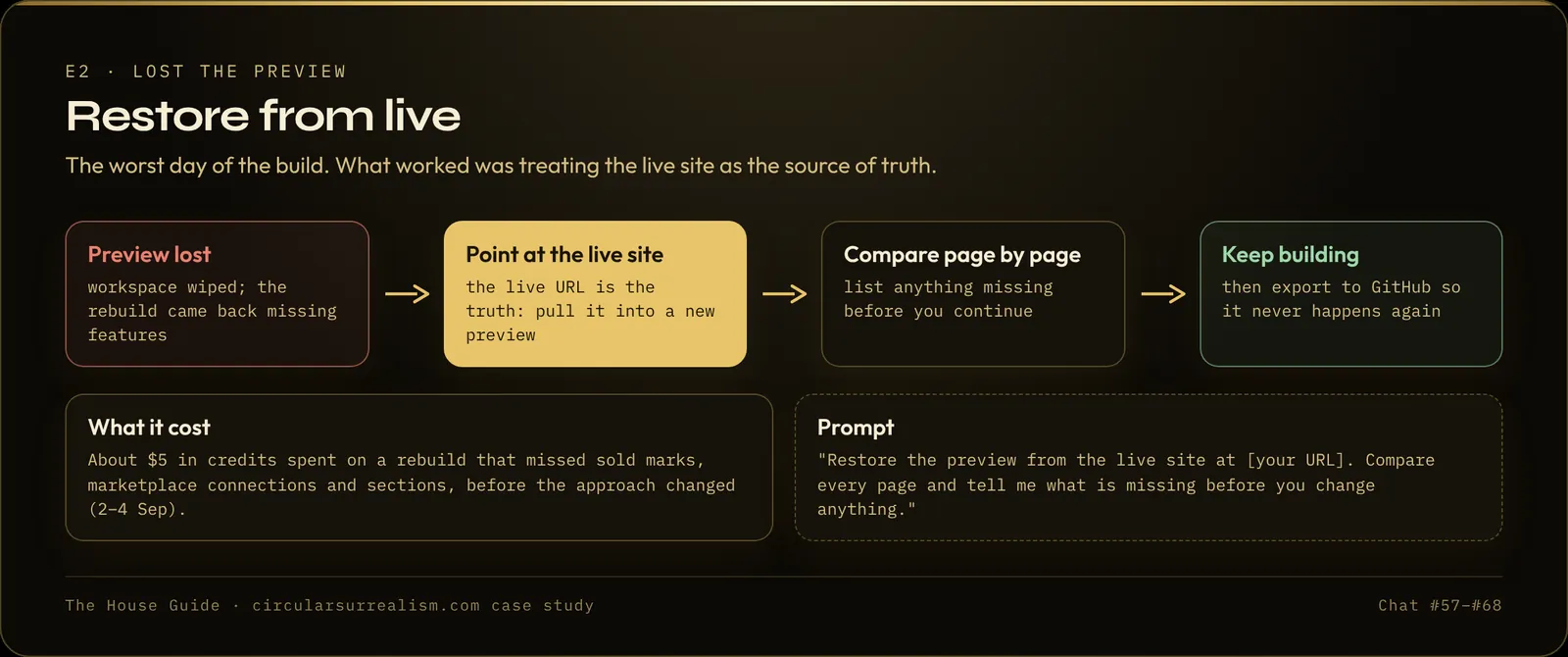
What actually happened when the preview was lost?
The order matters, because each step looked like a different problem.
- A normal evening of edits. On 2 September the artist was working on new themes and a small visit counter in the header.
- "It keeps on loading." The preview stopped opening. The builder answered that it was restoring the site "into this empty workspace from the live site." The editing copy was gone.
- A thin rebuild. The restored preview was missing a lot: the sold marks, the connections to the marketplaces that feed the listings, the works and collections sections, the activity ledger, and the homepage hero showed 6 works instead of 50.
- Credits ran out. The artist had spent their last credits on the rebuild, and then the preview pop-up stopped appearing on the phone at all. The next morning they estimated about $5 of credits had been wasted.
- The explanation. The builder's own account: the in-chat preview "went dark because the studio machine slept," and the editing room "was wiped overnight." The published site was never touched. Everything was still live at the domain.
So two different things had been mixed up: the editing copy in the conversation was gone, but the website was fine.
Is your live site actually gone?
Probably not. Check it first, before you ask for anything:
- Open your live address (your grok.me link or your own domain) on your phone.
- Walk the pages that matter most: the homepage, one item page, anything with live data.
If the live site works, you have not lost your website. You have lost the editing copy, and that can be rebuilt from the live site instead of from nothing.
If the live site is also gone, that is a different problem, and the backup in the last section is what saves you.
Step 1: Stop asking for a rebuild
A rebuild from a blank workspace makes the builder guess at everything you already decided. That is how the case study got a thinner site with the wrong hero and no sold marks. Each guess you then correct costs another round of credits.
Say it plainly and finally:
The preview lost our work. Do not rebuild from scratch. The live site at [URL] is the source of truth: restore from it, keep everything it has, then show me the preview. Tell me anything you could not restore.
In the case study, once the artist pointed at the live site, the builder said: "The live site is the source of truth." It read the published site's own files and put the real pages back (sold marks, marketplace listings, the 50-work hero, works, collections and the full activity ledger), then kept the new themes and visit counter on top.
Step 2: Get the preview to open again
If the builder says the preview is back but you cannot see it:
- Pull the chat down to refresh on the phone.
- Open the same conversation on a computer. The builder's own suggestion was to open the same conversation on grok.com on a computer if the iOS pop-up still hides.
- Don't send the same long prompt again while you wait. A repeated long prompt spends credits twice.
Step 3: Compare the restored preview with the live site, page by page
A restore that looks right on the homepage can still be wrong one page in. After the case-study restore, the artist walked the site and found four rooms that didn't match the live version:
- About was missing details that were on the live page
- Process had lost the hand-picked works for each step
- Reach had dropped some of the social cards
- The footer was missing some of the marketplace links
All of them were matched to the live site before anything was published.
Compare this preview with the live site at [URL], page by page. List anything on the live site that is missing or different in the preview (pages, sections, items, live data). Do not change anything yet.
Then do a final count before you publish. In the case study the check before the next publish confirmed the same numbers as the live site: 415 works, 25 collections, the 50-work hero, and the same sales totals.
Step 4: Check the small things that make a preview hang
During the first restore, the builder found the preview was stalling on empty media addresses (images and videos with no file behind them) and a heavy catalog, "not on your domain." Later in the build, on 16 October, a blank preview turned out to be one broken comma in a data file. Fixing that single character brought the preview back. For media-heavy sites, see also Website slow on mobile? 8 fixes for AI-built image and video sites.
Before you assume the worst:
The preview is blank or stuck loading. Before changing anything, check the data files for errors (a broken comma or bracket) and look for empty image or video links. Tell me what you find.
Step 5: Publish only when the preview matches
Do not publish a half-restored preview. Publishing replaces the live site, and the live site is your only full copy until you have a backup. In the case study the live site stayed untouched until the restored preview matched it. The new edits went out after that.
Step 6: Back up so the next loss is a non-event
The artist's own words: "This is the part I wish I had done earlier." Export to GitHub copies every file of the project into a repository you own. It is not the live site; it is the insurance if the conversation, the editing copy, or the platform ever goes away.
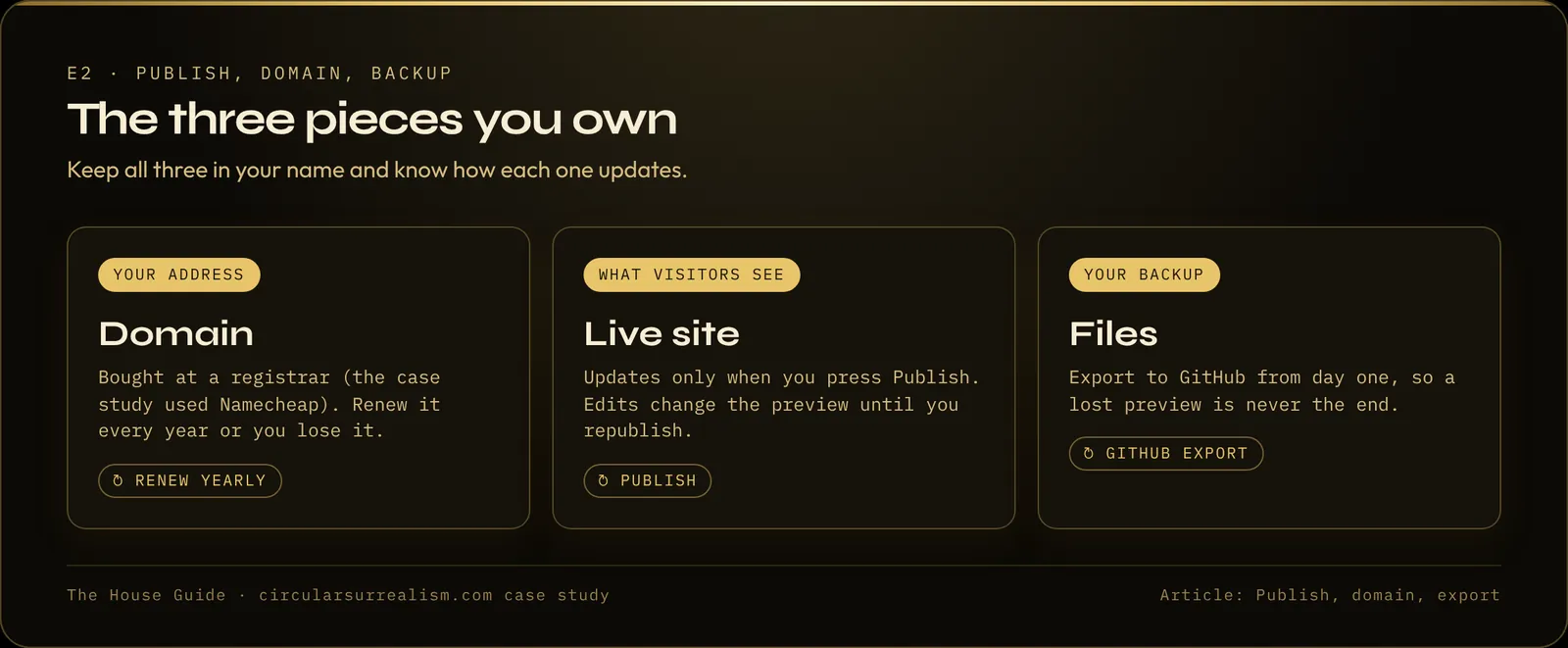
- Do it on day one, before anything goes wrong.
- Export again after each chapter you publish, "so the backup is not six months behind."
- If you can't find the button on a phone, use the same account on a computer.
The full steps are in Grok Build: publish, custom domain, GitHub backup. In this build, the artist first asked how export works on 15 September, after the loss, and did the first Export to GitHub a few days after that.
How do you avoid losing the preview in the first place?
- One site, one conversation. Keep every edit for one site in one thread, and start side projects in a new chat so they can't put the main site at risk. More on the method in How to build a website with AI, step by step.
- Publish in chapters. The live site was the copy that saved this build. A recent publish means a recent copy.
- Export after each chapter. GitHub is the copy that doesn't depend on the conversation.
- Keep a credit buffer before big changes. The build ran out of credits in the middle of hard fixes more than once, including during this recovery.
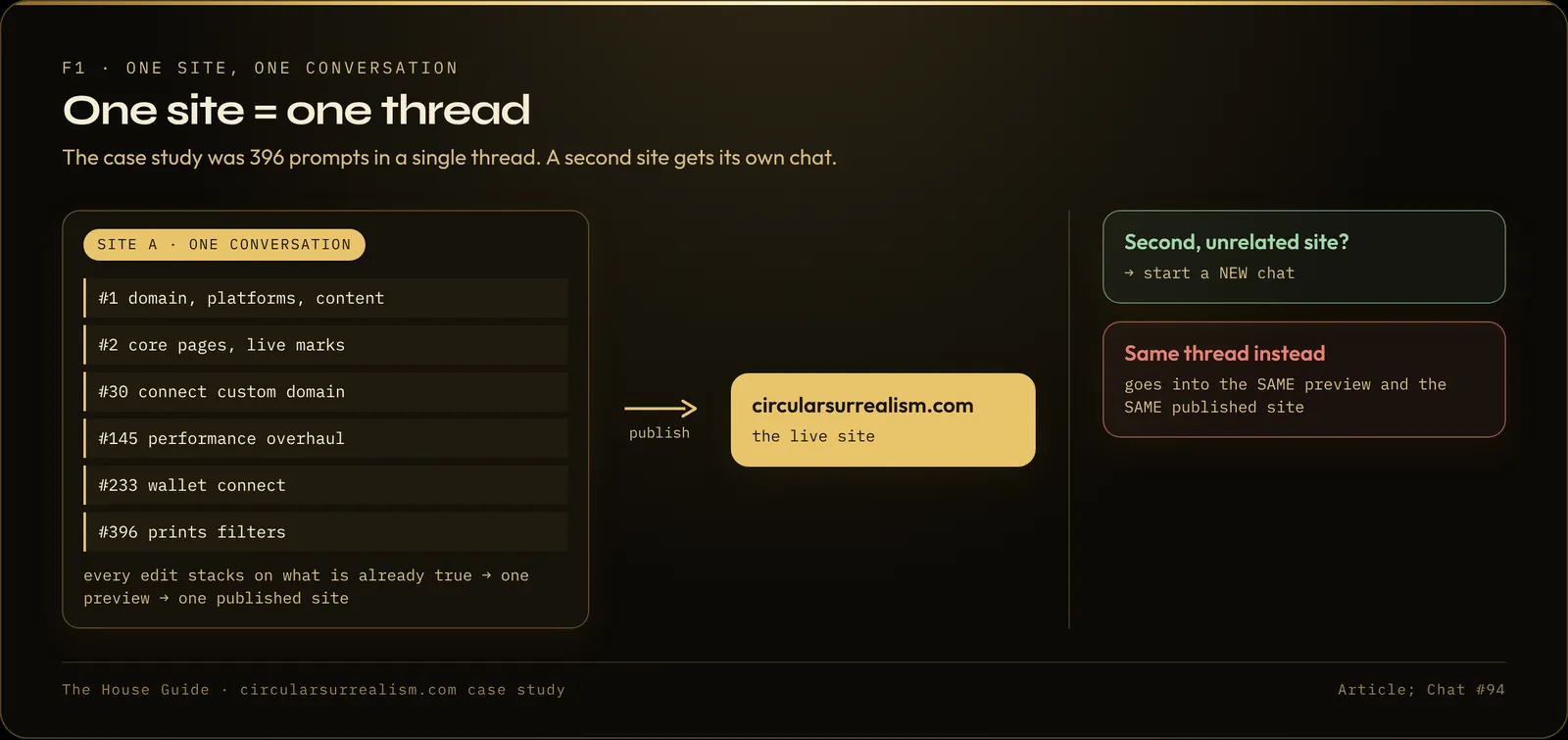
FAQ
Does losing the Grok Build preview delete my website?
Not in this case. The editing copy in the conversation was wiped, but the published site stayed live at its domain the whole time.
Should I start a new chat and rebuild?
No. A rebuild from a blank chat came back missing features and cost credits. Restoring from the live site, in the same conversation, is what worked.
Why is my Grok Build preview stuck loading?
In this build it was an editing workspace that had gone to sleep and come back empty, then empty media links and a heavy catalog. Another time it was one broken comma in a data file. Ask the builder to check for each of these before rebuilding anything.
Is GitHub export the same as publishing?
No. Publishing puts the site live. Export copies the files to a repository you own, as a backup.
Go further
Recovery is one lesson of the publishing module in The House Guide, the written path of the whole 396-prompt build, with the prompts and the failures. Quick Start covers this part (foundation, performance, publishing, recovery) in 39 lessons.
The guides
Build your own high-end site with AI
The House Guide
Most complete$29$39
$29 founding price for the first 50 buyers, code FOUNDING50
- 20 modules, 102 written lessons
- 126-page PDF + EPUB
- Deep dives: live data, live counters, catalog and shop, performance, deep zoom, hero and search, gallery, themes and UI
- Prompt library (18 prompts), troubleshooting playbook, build diary
- 30-day refund
Quick Start
$19
- 7 modules, 39 written lessons
- 55-page PDF + EPUB
- Planning and content, the full performance module, publish, domain, backup, launch review
- Prompt library (18 prompts)
- 30-day refund
Performance Checklist
Free
- 12-item checklist
- The full 7-lesson performance module
- 13-page PDF
Written guides, no coding needed, works with any AI website builder.
Built with Grok. The case-study site was built with Grok Build by xAI. This article and the guides are independent and are not made, endorsed or sponsored by xAI.